快速上手
为了简单,用sqlite来做演示,nuget安装Microsoft.EntityFrameworkCore.Sqlite
1
2
3
4
5
6
7
8
9
10
11
12
13
14
15
16
17
18
19
20
21
22
23
24
25
26
27
28
29
30
31
32
33
34
35
36
37
38
39
40
41
42
43
44
45
46
47
48
49
|
using Microsoft.EntityFrameworkCore;
public class Product
{
public int Id
{
get; set;
}
public string Name { get; set; } = string.Empty;
public double Price
{
get; set;
}
}
public class SimpleDbContext : DbContext
{
public DbSet<Product> Products
{
get; set;
}
protected override void OnConfiguring(DbContextOptionsBuilder optionsBuilder)
{
optionsBuilder.UseSqlite("Data Source=simple.db");
}
}
class Program
{
static void Main()
{
using var context = new SimpleDbContext();
context.Database.EnsureCreated();
context.Products.Add(new Product { Name = "无线鼠标", Price = 99.0 });
context.SaveChanges();
var item = context.Products.FirstOrDefault(p => p.Name == "无线鼠标");
Console.WriteLine($"[读取成功] 商品:{item?.Name},价格:{item?.Price}");
Console.ReadLine();
}
}
|
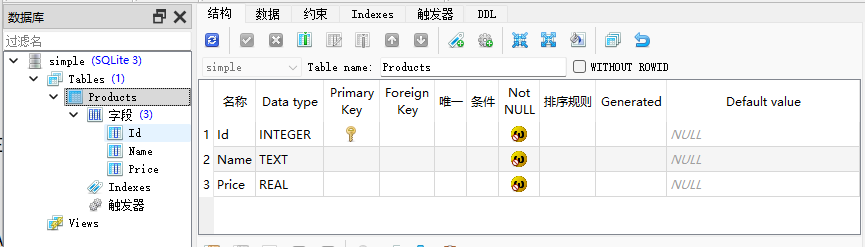
数据库配置
OnConfiguring (配置管道): 负责解决“数据库怎么连、连去哪”的问题。用来配置连接字符串、数据库驱动、日志打印等。
OnModelCreating (设置模型): 负责解决“表结构长啥样”的问题。用来显式配置表名、字段长度、索引、外键等数据库约束。
可以直接用DataAnnotations方式进行标注。
1
2
3
4
5
6
7
8
9
10
11
12
13
14
15
16
17
18
19
| [Table("tbl_users")]
public class User
{
[Key]
public int UserId
{
get; set;
}
[Required]
[MaxLength(50)]
public string Username { get; set; } = string.Empty;
[MaxLength(100)]
public string? Email
{
get; set;
}
}
|
也可以OnModelCreating中设置
1
2
3
4
5
6
7
8
9
10
11
12
13
14
15
16
17
18
19
20
21
22
23
24
25
26
27
28
29
30
31
32
33
34
35
36
37
38
39
40
41
42
43
44
45
46
47
48
49
| using Microsoft.EntityFrameworkCore;
public class Employee
{
public int EmpId { get; set; }
public string Name { get; set; } = string.Empty;
public string? Email { get; set; }
public decimal Salary { get; set; }
}
public class CompanyDbContext : DbContext
{
public DbSet<Employee> Employees { get; set; }
protected override void OnConfiguring(DbContextOptionsBuilder optionsBuilder)
{
optionsBuilder.UseSqlite("Data Source=company.db");
}
protected override void OnModelCreating(ModelBuilder modelBuilder)
{
base.OnModelCreating(modelBuilder);
modelBuilder.Entity<Employee>(entity =>
{
entity.ToTable("tbl_employee_tuples");
entity.HasKey(e => e.EmpId);
entity.Property(e => e.Name)
.HasColumnName("emp_name")
.HasMaxLength(50)
.IsRequired();
entity.Property(e => e.Salary)
.HasColumnType("decimal(18,2)");
entity.HasIndex(e => e.Email)
.IsUnique();
});
}
}
|
配置隔离
如果表多,都写在OnModelCreating会很乱,不便于管理,所以就可以对每个表写单独的配置类,实现IEntityTypeConfiguration<T> 接口就可以
1
2
3
4
5
6
7
8
9
10
11
12
13
14
15
16
17
18
19
20
21
22
| public class OrderConfiguration : IEntityTypeConfiguration<Order>
{
public void Configure(EntityTypeBuilder<Order> builder)
{
builder.ToTable("sys_orders");
builder.HasKey(o => o.Id);
builder.Property(o => o.OrderNo)
.HasMaxLength(32)
.IsRequired();
builder.Property(o => o.TotalAmount)
.HasColumnType("decimal(16,4)");
builder.Property(o => o.CreatedAt)
.HasDefaultValueSql("CURRENT_TIMESTAMP");
builder.HasIndex(o => o.OrderNo).IsUnique();
}
}
|
然后,让框架自动扫描,
1
2
3
4
5
6
7
8
9
10
11
12
13
14
15
16
17
| public class AdvancedDbContext : DbContext
{
public DbSet<Order> Orders { get; set; }
protected override void OnConfiguring(DbContextOptionsBuilder optionsBuilder)
{
optionsBuilder.UseSqlite("Data Source=advanced.db");
}
protected override void OnModelCreating(ModelBuilder modelBuilder)
{
base.OnModelCreating(modelBuilder);
modelBuilder.ApplyConfigurationsFromAssembly(typeof(AdvancedDbContext).Assembly);
}
}
|
生成数据库常见命令
nuget安装,Microsoft.EntityFrameworkCore.Tools,打开PMC
| 命令 | 作用 | 什么时候用 |
|---|
Add-Migration <名称> | 生成迁移脚本(暂存区) | 当你修改了实体类或 Fluent API 配置时 |
Update-Database | 将所有未应用的迁移推送到数据库 | 想让数据库结构与代码同步时 |
Remove-Migration | 撤销最后一次生成的迁移脚本 | Add-Migration 完发现代码写错了,且还没 Update-Database 时 |
Update-Database <以前的迁移名> | 数据库结构版本回滚 | 发现刚上线的版本有严重问题,想把数据库退回到历史某个状态时 |
Script-Migration | 将所有迁移直接打包成一个纯 .sql 文件 | 生产环境禁忌直接运行 Update-Database。应该用这个命令生成 SQL 脚本,交给 DBA 审核后再去生产环境执行。 |