快速体验 nuget安装Microsoft.Agents.AI.OpenAI,截止到本文,用的是1.17.0,如果用的是Azure则额外安装Azure.AI.OpenAI 1 2 3 4 5 6 7 8 AzureOpenAIClient client = new AzureOpenAIClient(new Uri(endpoint),new System.ClientModel.ApiKeyCredential(apikey)); ChatClientAgent agent = client.GetChatClient("gpt-5-nano" ).AsAIAgent(); AgentResponse response = await agent.RunAsync("中国的首都在哪里" ); Console.WriteLine(response.Text);
response中可以获得一些额外的信息,如,输出token,输出token等
1 2 3 4 Console.WriteLine($"- Input Tokens: {response.Usage.InputTokenCount} " ); Console.WriteLine($"- Cached Tokens: {response.Usage.CachedInputTokenCount ?? 0 } " ); Console.WriteLine($"- Output Tokens: {response.Usage.OutputTokenCount} " + $"({response.Usage.ReasoningTokenCount ?? 0 } being reasoning Tokens)" );
流式输出 1 2 3 4 5 6 7 ChatClientAgent agent = client.GetChatClient("gpt-5-nano" ).AsAIAgent(); await foreach (AgentResponseUpdate update in agent.RunStreamingAsync("如何做披萨?" )){ Console.Write(update); }
也可以先放进一个集合,根据需要输出
1 2 3 4 5 6 7 8 List<AgentResponseUpdate> updates = []; await foreach (AgentResponseUpdate update in agent.RunStreamingAsync("如何做包子?" )) { updates.Add(update); } AgentResponse response = updates.ToAgentResponse(); Console.Write(response);
聊天循环 大模型是没有记忆的,每次调用都会忘掉之前讲的话,解决方案就是把之前说的话和当前的话一并给大模型。直接放到一个AgentSession里面就可以
1 2 3 4 5 6 7 8 9 10 11 12 ChatClientAgent agent = client.GetChatClient("gpt-5-nano" ).AsAIAgent(); AgentSession session =await agent.CreateSessionAsync(); while (true ){ Console.Write("> " ); string input = Console.ReadLine() ?? "" ; await foreach (var update in agent.RunStreamingAsync(input,session)) { Console.Write(update); } }
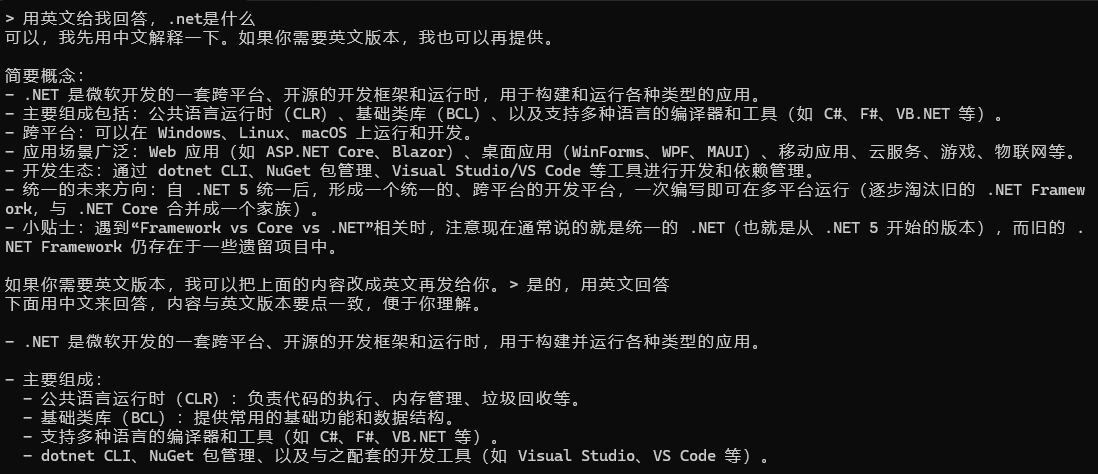
定义instructions 可以在AsAIAgent(instructions:"必须用中文回答")中指定instructions,它的优先级是最高的,即使我后面用冲突的指令。看下面案例
1 2 3 4 5 6 7 8 9 10 11 12 ChatClientAgent agent = client.GetChatClient("gpt-5-nano" ).AsAIAgent(instructions:"必须用中文回答" ); AgentSession session =await agent.CreateSessionAsync(); while (true ){ Console.Write("> " ); string input = Console.ReadLine() ?? "" ; await foreach (var update in agent.RunStreamingAsync(input,session)) { Console.Write(update); } }
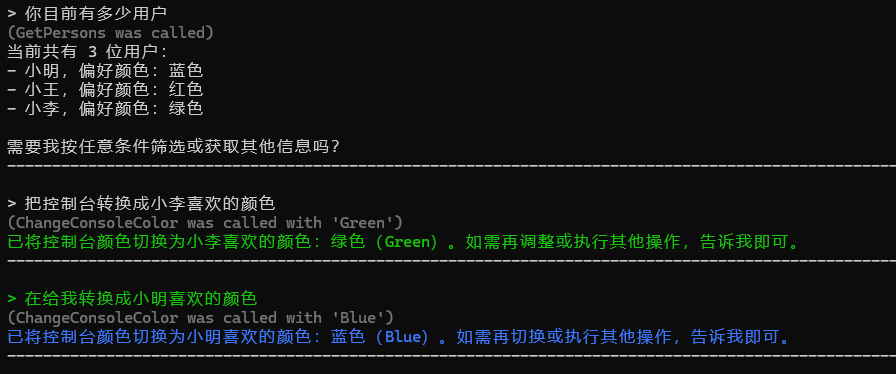
外部工具 自定义函数 首先定义外部工具,可以是静态的也可以是实例的
1 2 3 4 5 6 7 8 9 10 11 12 13 14 15 16 17 18 19 20 21 22 23 24 25 26 27 28 29 30 31 32 33 34 35 36 37 38 39 public record PersonInfo (string Name, string FavoriteColorpublic class PersonTools { public PersonInfo[] GetPersons () { Output.Gray("(GetPersons was called)" ); return GetData(); } public PersonInfo? GetPerson(string name) { Output.Gray($"(GetPerson was called with '{name} ')" ); PersonInfo[] data = GetData(); return data.FirstOrDefault(x => x.Name.Equals(name, StringComparison.CurrentCultureIgnoreCase)); } private static PersonInfo[] GetData () { return [ new PersonInfo("小明" , "蓝色" ), new PersonInfo("小王" , "红色" ), new PersonInfo("小李" , "绿色" ) ]; } } public class StaticClass { public static void ChangeConsoleColor (ConsoleColor color ) { Output.Gray($"(ChangeConsoleColor was called with '{color} ')" ); Console.ForegroundColor = color; } }
使用非常简单,可以声明
1 2 3 4 5 6 7 8 9 10 11 12 13 14 15 16 17 18 19 20 21 22 23 24 25 AzureOpenAIClient client = new AzureOpenAIClient(new Uri(endpoint),new System.ClientModel.ApiKeyCredential(apikey)); PersonTools personTools = new PersonTools(); ChatClientAgent agent = client.GetChatClient("gpt-5-nano" ) .AsAIAgent( instructions:"你知道用户信息以及可以转换控制台颜色" , tools: [ AIFunctionFactory.Create(personTools.GetPersons,"get_persons" ,"获取所有的用户" ), AIFunctionFactory.Create(personTools.GetPersons,"get_person" ,"通过姓名获取用户" ), AIFunctionFactory.Create(ChangeConsoleColor,description:"调整控制台颜色" ) ] ); AgentSession session =await agent.CreateSessionAsync(); while (true ){ Console.Write("> " ); string input = Console.ReadLine() ?? "" ; await foreach (var update in agent.RunStreamingAsync(input,session)) { Console.Write(update); } Output.Separator(); }
MCP 安装nuget包ModelContextProtocol
1 2 3 4 5 6 7 8 9 10 11 12 13 14 15 16 17 18 19 20 21 22 23 24 25 26 27 28 29 AzureOpenAIClient client = new AzureOpenAIClient(new Uri(endpoint),new System.ClientModel.ApiKeyCredential(apikey)); await using McpClient mcpClient = await McpClient.CreateAsync(new HttpClientTransport(new HttpClientTransportOptions{ Endpoint = new Uri("https://learn.microsoft.com/api/mcp" ), TransportMode = HttpTransportMode.StreamableHttp })); IList<McpClientTool> mcpTools = await mcpClient.ListToolsAsync(); ChatClientAgent agent = client.GetChatClient("gpt-5-nano" ) .AsAIAgent( instructions: "你是Microsoft Agent Framework C# 版本方面的专家(请调用工具获取相关知识),用简短方式回答" , tools: mcpTools.Cast<AITool>().ToList() ); AgentSession session =await agent.CreateSessionAsync(); while (true ){ Console.Write("> " ); string input = Console.ReadLine() ?? "" ; await foreach (var update in agent.RunStreamingAsync(input,session)) { Console.Write(update); } Output.Separator(); }
工具调用中间件 很多时候,需要打印工具调用日志,或者对特定工具的返回等进行操作
1 2 3 4 5 6 7 8 9 10 11 12 13 14 15 16 17 18 19 20 21 22 23 24 public static async ValueTask<object ?> Middleware(AIAgent agent, FunctionInvocationContext context, Func<FunctionInvocationContext, CancellationToken, ValueTask<object ?>> next, CancellationToken cancellationToken){ StringBuilder toolDetails = new (); toolDetails.Append($"-工具调用:{context.Function.Name} " ); if (context.Arguments.Count>0 ) { toolDetails.Append($"(参数:{string .Join("," ,context.Arguments.Select(x=> $"[{x.Key} ={x.Value} ]" ))} )" ); } Output.Yellow(toolDetails.ToString()); if (context.Function.Name == "get_person" ) { if (context.Arguments.Any(x => x.Value!.ToString()!.Equals("小明" , StringComparison.CurrentCultureIgnoreCase))) { throw new Exception("没有小明的数据" ); } if (context.Arguments.Any(x => x.Value!.ToString()!.Equals("小王" , StringComparison.CurrentCultureIgnoreCase))) { return "小王最喜欢橘黄色" ; } } return await next.Invoke(context, cancellationToken); }
1 2 3 4 5 6 7 8 9 10 11 12 13 14 15 16 17 18 19 20 21 22 23 24 25 26 27 AzureOpenAIClient client = new AzureOpenAIClient(new Uri(endpoint), new System.ClientModel.ApiKeyCredential(apikey)); PersonTools personTools = new PersonTools(); AIAgent agent = client.GetChatClient("gpt-5-nano" ) .AsAIAgent( instructions: "你知道用户信息以及可以转换控制台颜色" , tools: [ AIFunctionFactory.Create(personTools.GetPersons,"get_persons" ,"获取所有的用户" ), AIFunctionFactory.Create(personTools.GetPersons,"get_person" ,"通过姓名获取用户" ), AIFunctionFactory.Create(ChangeConsoleColor,description:"调整控制台颜色" ) ] ).AsBuilder() .Use(Middleware) .Build(); AgentSession session = await agent.CreateSessionAsync(); while (true ){ Console.Write("> " ); string input = Console.ReadLine() ?? "" ; await foreach (var update in agent.RunStreamingAsync(input, session)) { Console.Write(update); } Output.Separator(); }
将其他智能体作为工具 1 2 3 4 5 6 7 8 9 10 11 12 13 14 15 16 17 18 ChatClientAgent astronomyAgent = client .GetChatClient("gpt-5.2" ) .AsAIAgent( name: "AstronomyAgent" , instructions: "You an expert in Astronomy" ); AIAgent agent = client .GetChatClient("gpt-4.1-nano" ) .AsAIAgent( name: "MainAgent" , instructions: "Refer all astronomy questions to the 'AstronomyAgent'" , tools: [ astronomyAgent.AsAIFunction(), ]) .AsBuilder() .Use(Middleware) .Build();
结构化输出 使用很简单,创建类,然后用RunAsync的泛型
1 2 3 4 5 6 7 8 9 10 11 12 13 14 15 16 17 18 19 20 21 22 23 24 25 26 27 class MovieResult { public required List<Movie> Movies { get ; set ; } } class Movie { public required string Title { get ; set ; } public required string Director { get ; set ; } public required int YearOfRelease { get ; set ; } public required decimal ImdbScore { get ; set ; } }
AgentResponse<MovieResult> response = await agent.RunAsync<MovieResult>(question);调用
查看请求详细过程 有时候,我们需要查看在请求过程中,具体发送的是什么
1 2 3 4 5 6 7 8 9 10 11 12 13 14 15 16 17 18 19 20 21 22 23 24 25 26 27 28 29 30 31 32 33 34 35 36 37 38 39 40 41 42 43 44 45 46 47 48 49 50 51 52 53 54 55 56 57 58 59 60 61 62 63 64 65 66 67 68 69 70 71 72 73 74 75 76 internal class Program { private static async Task Main (string [] args { IConfigurationRoot config = new ConfigurationBuilder().AddUserSecrets<Program>().Build(); string endpoint = config["endpoint" ]; string apikey = config["apikey" ]; using CustomClientHttpHandler handler = new CustomClientHttpHandler(); using HttpClient httpClient = new HttpClient(handler); AzureOpenAIClient client = new AzureOpenAIClient(new Uri(endpoint), new System.ClientModel.ApiKeyCredential(apikey), new AzureOpenAIClientOptions { Transport = new HttpClientPipelineTransport(httpClient) }); ChatClientAgent agent = client .GetChatClient("gpt-5-nano" ) .AsAIAgent(tools: [AIFunctionFactory.Create((string city)=> "今天晴天,气温25摄氏度" )]); var response = await agent.RunAsync<WeatherResponse>("今天北京天气如何?" ); Console.Read(); } } class WeatherResponse { public required string City { get ; set ; } public required string Condition { get ; set ; } public required int DegreesFahrenheit { get ; set ; } public required int DegreesCelsius { get ; set ; } } class CustomClientHttpHandler : HttpClientHandler { protected override async Task<HttpResponseMessage> SendAsync (HttpRequestMessage request, CancellationToken cancellationToken ) { string requestString = await request.Content?.ReadAsStringAsync(cancellationToken)!; Output.Green($"Raw Request ({request.RequestUri} )" ); Output.Gray(MakePretty(requestString)); Output.Separator(); HttpResponseMessage response = await base .SendAsync(request, cancellationToken); string responseString = await response.Content.ReadAsStringAsync(cancellationToken); Output.Green("Raw Response" ); Output.Gray(MakePretty(responseString)); Output.Separator(); return response; } private string MakePretty (string input { try { JsonElement jsonElement = JsonSerializer.Deserialize<JsonElement>(input); return JsonSerializer.Serialize(jsonElement, new JsonSerializerOptions { WriteIndented = true , Encoder = JavaScriptEncoder.UnsafeRelaxedJsonEscaping }); } catch (Exception e) { return input; } } }
RAG 快速体验 1 2 3 4 5 6 7 8 9 10 11 12 13 14 15 16 17 18 19 20 21 22 23 24 25 26 27 28 29 30 31 32 33 34 35 36 37 38 39 40 41 42 public static class VectorMatch { public static float MatchScore (ReadOnlyMemory<float > a, ReadOnlyMemory<float > b ) { float cos = CosineSimilarity(a, b); return cos <= 0.0f ? 0.0f : cos; } private static float CosineSimilarity (ReadOnlyMemory<float > a, ReadOnlyMemory<float > b ) { ReadOnlySpan<float > sa = a.Span; ReadOnlySpan<float > sb = b.Span; if (sa.Length != sb.Length) { throw new ArgumentException("Vectors must have the same dimension." ); } double dot = 0.0 ; double normA = 0.0 ; double normB = 0.0 ; for (int i = 0 ; i < sa.Length; i++) { double ai = sa[i]; double bi = sb[i]; dot += ai * bi; normA += ai * ai; normB += bi * bi; } double denom = Math.Sqrt(normA) * Math.Sqrt(normB); if (denom == 0.0 ) { return 0.0f ; } return (float )(dot / denom); } }
1 2 3 4 5 6 7 8 9 10 11 12 13 14 15 16 17 18 19 20 21 22 23 24 25 26 27 28 29 30 31 32 AzureOpenAIClient client = new AzureOpenAIClient(new Uri(endpoint), new System.ClientModel.ApiKeyCredential(apikey)); IEmbeddingGenerator<string , Embedding<float >> embeddingGenerator = client.GetEmbeddingClient("text-embedding-3-small" ).AsIEmbeddingGenerator(); string wifiData = "问:办公室wifi密码是多少?答:wifi密码是123456" ; Embedding<float > vectorOfWifiData = await embeddingGenerator.GenerateAsync(wifiData); string otherData = "" " 问:《肖申克的救赎》导演是谁,IMDb评分多少? 答:导演是弗兰克·德拉邦特,1994年上映,IMDb9.3分,影片借监狱故事探讨希望与自由。 问:千与千寻讲述什么故事? 答:宫崎骏2001年作品,IMDb8.6分。少女误入神隐世界,历经磨难学会勇敢善良,用奇幻故事诠释成长初心。 问:星际穿越的核心看点? 答:诺兰2014年执导,IMDb8.7分。将宇宙科幻与父女亲情结合,在宏大时空下诠释爱与人类生存的求索。 " "" ; Embedding<float > vectorOfotherData = await embeddingGenerator.GenerateAsync(otherData); Embedding<float > vectorOfQuestion = await embeddingGenerator.GenerateAsync("wifi密码是多少" ); float question1MatchScore = VectorMatch.MatchScore(vectorOfWifiData.Vector, vectorOfQuestion.Vector); Console.WriteLine($"==分值1{question1MatchScore} ==" ); float question2MatchScore = VectorMatch.MatchScore(vectorOfotherData.Vector, vectorOfQuestion.Vector); Console.WriteLine($"==分值2{question2MatchScore} ==" );
向量数据库注入数据 为了方便,使用本地的sqlite,nuget安装CommunityToolkit.VectorData.SqliteVec,截止到当前,还是预览版
创建类和数据 1 2 3 4 5 6 7 8 9 10 11 12 13 14 15 16 17 18 19 20 21 22 23 24 25 26 27 28 29 30 31 32 public record KnowledgeBaseEntry (string Question, string Answerpublic class KnowledgeBaseVectorRecord { [VectorStoreKey ] public required Guid Id { get ; set ; } [VectorStoreData ] public required string Question { get ; set ; } [VectorStoreData ] public required string Answer { get ; set ; } [VectorStoreVector(1536) ] public string Vector => $"Q: {Question} - A: {Answer} " ; } List<KnowledgeBaseEntry> knowledgeBase = [ new ("办公室的WIFI密码是什么?" , "密码是'Guest42'" ), new ("平安夜是全天休假还是半天休假" , "全天休假" ), ... ];
注入 1 2 3 4 5 6 7 8 9 10 11 12 13 14 15 16 17 18 19 20 21 22 23 24 25 26 27 28 AzureOpenAIClient client = new AzureOpenAIClient(new Uri(endpoint), new System.ClientModel.ApiKeyCredential(apikey)); IEmbeddingGenerator<string , Embedding<float >> embeddingGenerator = client.GetEmbeddingClient("text-embedding-3-small" ).AsIEmbeddingGenerator(); VectorStore vectorStore = new SqliteVectorStore("Data Source=vector.db" , new SqliteVectorStoreOptions { EmbeddingGenerator = embeddingGenerator, }); VectorStoreCollection<Guid, KnowledgeBaseVectorRecord> vectorStoreCollection = vectorStore.GetCollection<Guid, KnowledgeBaseVectorRecord>("knowledge_base" ); await vectorStoreCollection.EnsureCollectionExistsAsync();foreach (var entry in knowledgeBase){ await vectorStoreCollection.UpsertAsync(new KnowledgeBaseVectorRecord { Id=Guid.NewGuid(), Question = entry.Question, Answer = entry.Answer }); } await foreach (KnowledgeBaseVectorRecord item in vectorStoreCollection.GetAsync(record =>record .Id !=Guid.Empty,int .MaxValue)){ Console.WriteLine($"问:{item.Question} - 答:{item.Answer} - Vector:{item.Vector} " ); }
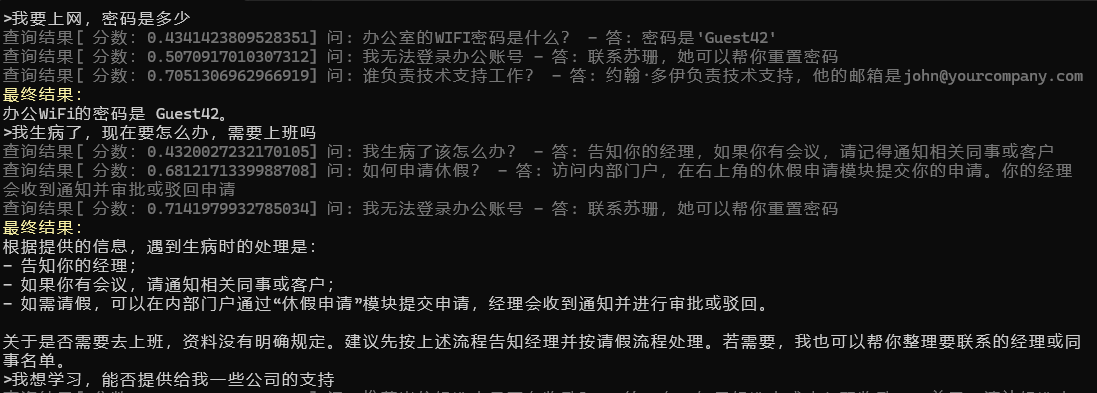
检索 1 2 3 4 5 6 7 8 9 10 11 12 13 14 15 16 17 18 19 20 21 22 23 24 25 26 27 28 29 30 31 32 33 34 35 36 37 38 39 40 AzureOpenAIClient client = new AzureOpenAIClient(new Uri(endpoint), new System.ClientModel.ApiKeyCredential(apikey)); IEmbeddingGenerator<string , Embedding<float >> embeddingGenerator = client.GetEmbeddingClient("text-embedding-3-small" ).AsIEmbeddingGenerator(); VectorStore vectorStore = new SqliteVectorStore("Data Source=vector.db" , new SqliteVectorStoreOptions { EmbeddingGenerator = embeddingGenerator, }); VectorStoreCollection<Guid, KnowledgeBaseVectorRecord> vectorStoreCollection = vectorStore.GetCollection<Guid, KnowledgeBaseVectorRecord>("knowledge_base" ); ChatClientAgent agent = client.GetChatClient("gpt-5-nano" ) .AsAIAgent(instructions:"你要从内部知识库中提取信息" ); AgentSession session = await agent.CreateSessionAsync(); while (true ){ Console.Write(">" ); string input = Console.ReadLine()??"" ; StringBuilder mostSimilarknowledge = new StringBuilder(); await foreach (var searchResult in vectorStoreCollection.SearchAsync(input, 3 )) { string searchResultAsQAndA = $"问: {searchResult.Record.Question} - 答: {searchResult.Record.Answer} " ; Output.Gray($"查询结果[ 分数:{searchResult.Score} ] {searchResultAsQAndA} " ); mostSimilarknowledge.AppendLine(searchResultAsQAndA); } List<ChatMessage> messagesToSend = [ new ChatMessage(ChatRole.User,"这是相关的信息:" + mostSimilarknowledge), new ChatMessage(ChatRole.User,input) ]; AgentResponse response = await agent.RunAsync(messagesToSend, session); Output.Yellow("最终结果:" ); Console.WriteLine(response); }
把RAG查询当作工具 有时候不是每次都需要查询本地数据库,可以把RAG查询当作工具,让大模型根据需要,自主判断是否需要进行查询
先定义一个本地工具 1 2 3 4 5 6 7 8 9 10 11 12 13 14 class SearchTool (VectorStoreCollection <Guid , KnowledgeBaseVectorRecord > vectorStoreCollection ) { public async Task<string > Search (string input { StringBuilder mostSimilarknowledge = new StringBuilder(); await foreach (var searchResult in vectorStoreCollection.SearchAsync(input, 3 )) { string searchResultAsQAndA = $"问: {searchResult.Record.Question} - 答: {searchResult.Record.Answer} " ; Output.Gray($"查询结果[ 分数:{searchResult.Score} ] {searchResultAsQAndA} " ); mostSimilarknowledge.AppendLine(searchResultAsQAndA); } return mostSimilarknowledge.ToString(); } }
设置对话 1 2 3 4 5 6 7 8 9 10 11 12 13 14 15 16 17 18 19 20 21 22 23 24 25 26 27 28 29 30 31 32 33 34 AzureOpenAIClient client = new AzureOpenAIClient(new Uri(endpoint), new System.ClientModel.ApiKeyCredential(apikey)); IEmbeddingGenerator<string , Embedding<float >> embeddingGenerator = client.GetEmbeddingClient("text-embedding-3-small" ).AsIEmbeddingGenerator(); VectorStore vectorStore = new SqliteVectorStore("Data Source=vector.db" , new SqliteVectorStoreOptions { EmbeddingGenerator = embeddingGenerator, }); VectorStoreCollection<Guid, KnowledgeBaseVectorRecord> vectorStoreCollection = vectorStore.GetCollection<Guid, KnowledgeBaseVectorRecord>("knowledge_base" ); SearchTool searchTool = new SearchTool(vectorStoreCollection); ChatClientAgent agent = client.GetChatClient("gpt-5.2" ).AsAIAgent( instructions: "你给我回答问题,可以从内部数据库中查找内容" , tools: [AIFunctionFactory.Create(searchTool.Search, "search_knowledge" )] ); AgentSession session = await agent.CreateSessionAsync(); while (true ){ Console.Write("> " ); string input = Console.ReadLine() ?? "" ; AgentResponse response = await agent.RunAsync(input, session); { Console.WriteLine(response); } Output.Separator(); }